
Remove watermark, text & Logo from video without Blur
Drag and drop your video here
Tasks
How to remove text & logo from video
Upload video
MP4 and MOV formats are supported. Max 15 min, up to 1080P
Choose removal method
Select [Box] for static watermarks, or switch to [Full Video] for moving ones.
Submit and download
Submit your task for removal. Download the watermark-free video after it completes.
Smart Video Text Remover: No Quality Loss, No Blur
Erase text watermarks without sacrificing video quality. Our advanced AI detects text with precision and intelligently restores the background behind it. The result? A flawless, clean video that looks like the text was never there—no blur, no traces.

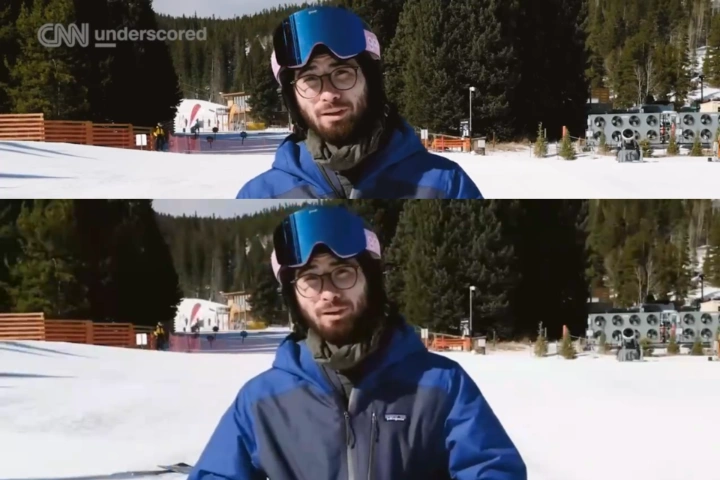
Remove Logos & TV Station Marks
Experience the latest in video segmentation technology. Our AI precisely isolates and removes complex logos and TV station marks of any shape. Achieve a seamless, clean look—no blur, no mosaics, no traces left behind.
Comparison of Video Removal Methods

Generative AI (Cleanvid)
Pixel-perfect restoration. Seamless remove floating watermarks.

Gaussian Blur (Capcut)
Leaves obvious blurry patches. Unable to handle floating text watermarks.

Open Source Inpainting
On complex backgrounds, it leaves visible blur traces and tends to distort the background details.
The Ultimate Solution for Downloaded Video Cleanup
For downloaded video, Cleanvid is your best choice. With just one click, it removes nearly all social media watermarks, text overlays, logos, and subtitles.


The Online Watermark Remover: Fast, Free of Installs
CleanVid brings you the latest AI watermark removal technology straight to your web browser.
Our powerful cloud servers do all the hard work. You just upload video and select the text or logo to remove. Access our tool instantly—anytime you need it.
FAQ About video text and logo removal
What types of video watermarks can Cleanvid remove?
▾
CleanVid utilizes advanced video inpainting technology to erase various types of watermarks. Once removed, there are no obvious blurs or traces—often looking as if the watermark never existed. CleanVid effectively removes text, logos, TV station IDs, subtitles, and floating watermarks.
However, watermarks can be complex. Sometimes they blend seamlessly with the background, which may lead to imperfect removal. Therefore, we cannot guarantee perfect results for every single case. We are continuously optimizing our algorithms, and we welcome you to submit any "bad cases" to help us improve.
What is the difference between [Box] and [Full Video] modes?
▾
Box Mode only detects and erases watermarks within the specific area you select. In Full Video Mode, CleanVid automatically scans the entire video frame to identify and remove watermarks (ideal for moving/floating watermarks).
How long does the video processing take?
▾
Processing time depends on the video resolution and the size of the selected erasure area. Higher resolutions and larger erasure areas will increase processing time. Generally, for a 1080P video, it takes about 2-3 minutes to process every 1 minute of footage. We appreciate your patience.
How do I remove floating watermarks?
▾
To remove floating watermarks, simply select the Full Video Mode. CleanVid will automatically detect the moving watermark within the frame and remove it seamlessly.
Will the video quality decrease after processing?
▾
We maintain the original video bitrate during output. Therefore, the visual quality remains consistent with your source video, with no noticeable degradation.
How long are my uploaded videos stored on the server?
▾
Videos uploaded to CleanVid are stored for 7 days. After this period, they will be automatically and permanently deleted. Please ensure you download your processed videos promptly.
How can I delete the text or watermark from mobile?
▾
CleanVid fully supports video watermark removal on mobile devices. Simply open app.cleanvid.pro in your mobile browser (such as Safari or Chrome). You can upload videos directly from your phone and, once processed, save the result back to your photo album or gallery.
How does Cleanvid charge?
▾
CleanVid deducts credits based on the duration of the video being processed. The standard rate is 5 credits per 30 seconds of video.
Upon registration, you will receive a Welcome Bonus of 8 credits to experience our service. If you are satisfied with the results, you can purchase additional credits (Pay-as-you-go) or subscribe to a plan. For detailed costs, please check our Pricing page.
Customer Support
If you need help or are interested in a partnership, feel free to reach out to [email protected].